
VSCode设置Git Bash终端
- 打开vscode
- 文件->首选项->设置,打开设置(快捷键:
ctrl + ,) - 搜索
shell windows
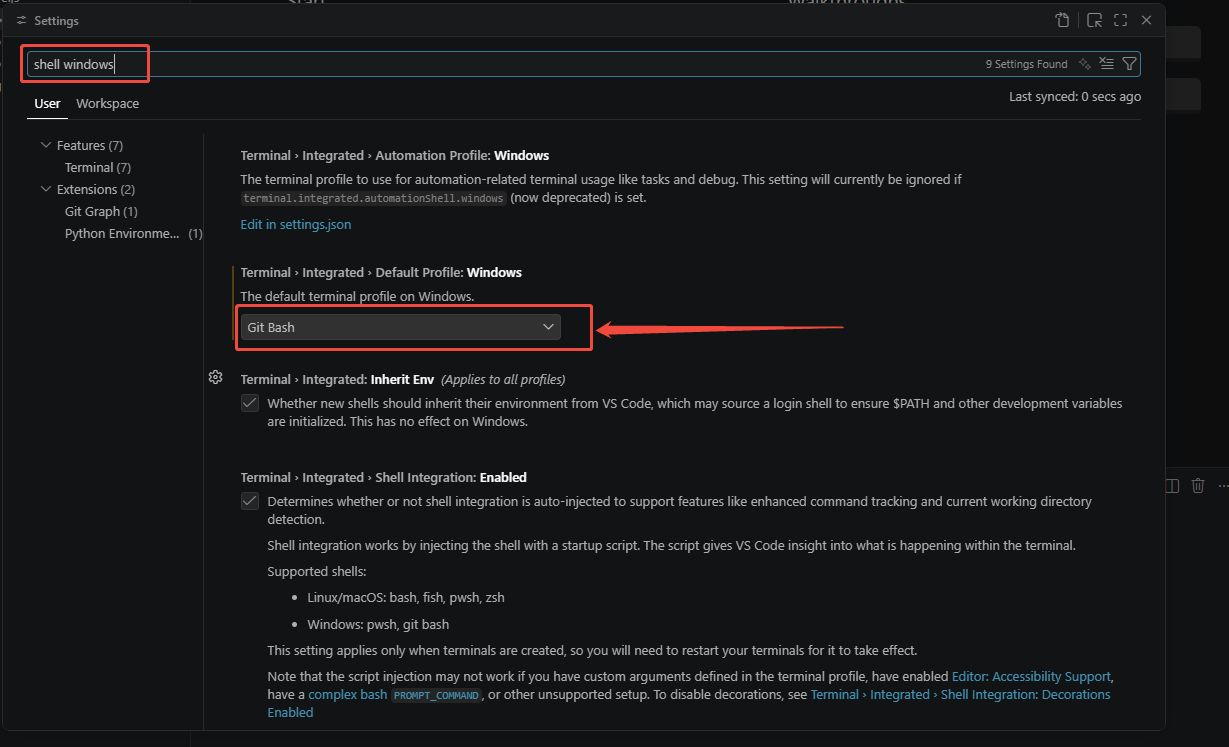
- 选择默认的终端为Git Bash
- 重启VSCode后,新建的终端将默认使用Git Bash。
本博客所有文章除特别声明外,均采用 CC BY-NC-SA 4.0 许可协议。转载请注明来源 暮色之狐!
 wechat
 alipay
相关推荐

2026-09-08
把Git Bash的提示符搬到Linux上,用了就回不去了
用过Git Bash的朋友应该都有同感——那个默认的提示符,简直是为一眼看清自己在哪里量身定做的。用户名、主机名、当前目录,颜色分明,换行整齐,尤其是目录层级一多,/home/project/src/module/feature 这种长串也能一目了然,不会和前面的信息挤成一团。 可一旦切到Linux原生终端(比如Ubuntu的bash),画风突变——默认的 \u@\h:\w$ 虽然简洁,但路径一深,提示符就长到占满半行,看着累,复制输出时还容易把路径和命令搞混。 我一直在想要是能把Git Bash那套提示符搬到Linux上就好了。最近折腾了一下,发现其实一行配置就搞定,而且完全不用装额外工具。 核心操作编辑 ~/.bashrc,在文件末尾追加: 1export PS1='\[\033[32m\]\u@\h \[\033[35m\]$MSYSTEM \[\033[33m\]\w\[\033[0m\]\n\$ ' 保存退出后,执行: 1source ~/.bashrc 效果对比 能够明显看到,命令行以独立成行的方式呈现,有助于将注意力聚焦于命令本身,有效规避...
2025-11-18
VSCode Python开发配置
Jupyter VSCode中安装jupter插件 使用#%%分割代码块 .ipynb文件中使用jupyter vscode中运行jupter时提示需要安装ipykernel,安装报错可以执行以下脚本进行安装 打开工程:code + 路径 pip install -i https://pypi.tuna.tsinghua.edu.cn/simple ipykernel Pylance Python › Analysis: auto format string Python › Analysis › Inlay Hints: Call Argument Names 选择partial Python › Analysis: Type Checking Mode 选择standard Python › Analysis: inlay Hints:Function Return Types IntelliCode CompletionsAI自动补全功能 Code Spell Checker单词拼写检查 Error lens错误检查

2025-11-18
VS Code快捷键指南
打开工程:code + 路径 打开指定文件:ctrl + p 打开/关闭终端:ctrl + ` (1左边的按键) 跳转到行:ctrl + g 按单词移动光标:ctrl + 左右 选中单词:ctrl + d (重复按可以多选) 选中行:ctrl + l (重复按会同时选择下一行) 移动行:alt + 上下 格式化代码:ctrl + shift + f 跳转到定义:f12 查看当前文件符号:ctrl + shift + o 剪切/复制当前行:ctrl + x / ctrl + c (什么都不选的时候) 切换tab:alt+数字 顺序切换tab:ctrl + pageup / pagedown 关闭文件:ctrl+w 关闭所有文件:ctrl + k w (ctrl不松手) ctrl+b 打开主侧边栏 ctrl+shift+e 打开文件管理器 ctrl+0 焦点聚焦到主侧边栏 ctrl+1 焦点聚焦到代码编辑器 ctrl+shift+space 重新出现函数信息提示 ctrl+\ 添加分屏 ctrl + d 选中当前内容,连续快捷键会逐个选...